
SCHOOL WORLD  - NEWS
  • Home
  • EDUNEWS
  • EDUVLOG
  • EDUTECH
  • SCIENCE
  • BUSINESS
  • HEALTH
  • SPORTS
  • WORLD
  • EDUTAINMENT
  • RADIO
  • CONTACT US
No Result
View All Result
  • Home
  • EDUNEWS
  • EDUVLOG
  • EDUTECH
  • SCIENCE
  • BUSINESS
  • HEALTH
  • SPORTS
  • WORLD
  • EDUTAINMENT
  • RADIO
  • CONTACT US
No Result
View All Result
SCHOOL WORLD  - NEWS
No Result
View All Result
Home Technology

This Hidden iPhone Setting Makes Your FaceTimes Sound Clearer

SchoolWorldMedia by SchoolWorldMedia
April 9, 2023
in Technology
0
This Hidden iPhone Setting Makes Your FaceTimes Sound Clearer
0
SHARES
15
VIEWS
Share on FacebookShare on Twitter


FaceTime calls can be hectic. From ensuring you have a good connection so your video isn’t choppy to making sure the other person doesn’t put their phone up to their ear, there are plenty of ways a video call can go awry. But there is something you can do to cut back the chaos: enable your iPhone’s Voice Isolation feature. 

CNET Tech Tips logo

Voice isolation for FaceTime calls was introduced with the release of iOS 15 in 2021. The feature muffles background noises, like the sound of kids playing in a nearby room or your dog barking at something outside, so others on the FaceTime call can hear you without interruptions. 

However, you won’t find the Voice Isolation feature in Settings, as you might expect. Instead, you have to be on a FaceTime call to enable it. But once you activate the feature, it will stay on the next time you’re on a FaceTime call.

Here’s how to activate Voice Isolation so people can hear you more clearly in FaceTime calls. If you prefer voice calls, you can enable Voice Isolation for that too, thanks to iOS 16.4.

How to enable Voice Isolation

1. Start or join a FaceTime call.

2. Swipe down from the top-right corner of your screen to access your Control Center.

Control Center menu showing Mic Mode

Mic Mode appears in your Control Center when you’re in a FaceTime call.


Zach McAuliffe/CNET

3. Tap Mic Mode near the top-right corner of your screen. 

4. Tap Voice Isolation.

Pro tip: You don’t have to interrupt a FaceTime call with family and friends to turn this feature on. You can call yourself on FaceTime and enable Voice Isolation following the steps above. 

How to enable Wide Spectrum

In Mic Mode, there’s another feature alongside Voice Isolation called Wide Spectrum. While Voice Isolation muffles other noises around you in a FaceTime call, Wide Spectrum enhances the noises around you without affecting your voice. 

Wide Spectrum is good for conference calls over FaceTime or if you have a large group of people FaceTiming someone else. If you have a little brother or sister who moves away to college and you and your family want to wish them a happy birthday, Wide Spectrum can help you all sing happy birthday to them at once.
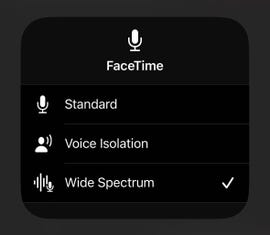
FaceTime options Standard, Voice Isolation and Wide Spectrum

Opening Mic Mode shows you Standard, Voice Isolation and Wide Spectrum options.


Zach McAuliffe/CNET

To enable Wide Spectrum, follow the steps above, but tap Wide Spectrum instead of Voice Isolation. 

Like Voice Isolation, Wide Spectrum will stay enabled the next time you make a FaceTime call. To disable either Voice Isolation or Wide Spectrum, follow the instructions above and tap Standard. This will return your microphone to its default setting.

For more on your iPhone, check out the how to turn on Voice Isolation for phone calls, 13 iPhone features you might not know about and 22 iPhone settings you should change now.


Now playing:
Watch this:

iOS 16: Powerful Features You May Have Missed


6:28



Source link

Previous Post

Guardiola Hails Haaland As On Same Level As Messi, Ronaldo As Man City Thump Southampton

Next Post

Merger Watch: Cannibalism as a way to increase enrollment

SchoolWorldMedia

SchoolWorldMedia

Next Post
Merger Watch: Cannibalism as a way to increase enrollment

Merger Watch: Cannibalism as a way to increase enrollment

Leave a Reply Cancel reply

Your email address will not be published. Required fields are marked *

Recent News

3 ways I use 3D printing to keep my photography hobby from sending me into bankruptcy

3 ways I use 3D printing to keep my photography hobby from sending me into bankruptcy

August 5, 2026
OPINION: America’s teacher shortage is worse than you think. But there’s a way to fix it

OPINION: America’s teacher shortage is worse than you think. But there’s a way to fix it

August 5, 2026
Crab Sports promo code for 2026: 100% first bet profit boost up to 0

Crab Sports promo code for 2026: 100% first bet profit boost up to $500

August 5, 2026
Ted Lasso Doesn’t Know What to Do With Women’s Soccer

Ted Lasso Doesn’t Know What to Do With Women’s Soccer

August 5, 2026
Follow Us:

Browse by Category

Business
Edunews
Edutainment
Eduvlog
Election
Health

Science
Sports
Technology
World

Recent News

3 ways I use 3D printing to keep my photography hobby from sending me into bankruptcy

3 ways I use 3D printing to keep my photography hobby from sending me into bankruptcy

by SchoolWorldMedia
August 5, 2026
0

OPINION: America’s teacher shortage is worse than you think. But there’s a way to fix it

OPINION: America’s teacher shortage is worse than you think. But there’s a way to fix it

by SchoolWorldMedia
August 5, 2026
0

@ 2023 – All Rights Reserved by > SchoolWorldMedia.com | Privacy policy

No Result
View All Result
  • Home
  • EDUNEWS
  • EDUVLOG
  • EDUTECH
  • SCIENCE
  • BUSINESS
  • HEALTH
  • SPORTS
  • WORLD
  • EDUTAINMENT
  • RADIO
  • CONTACT US

© 2026 JNews - Premium WordPress news & magazine theme by Jegtheme.